1. Logging In
-
Go to your WordPress login page: yourwebsite.com/wp-admin
-
Enter your username and password
-
Click Log In

2. Go to: Products -> Categories
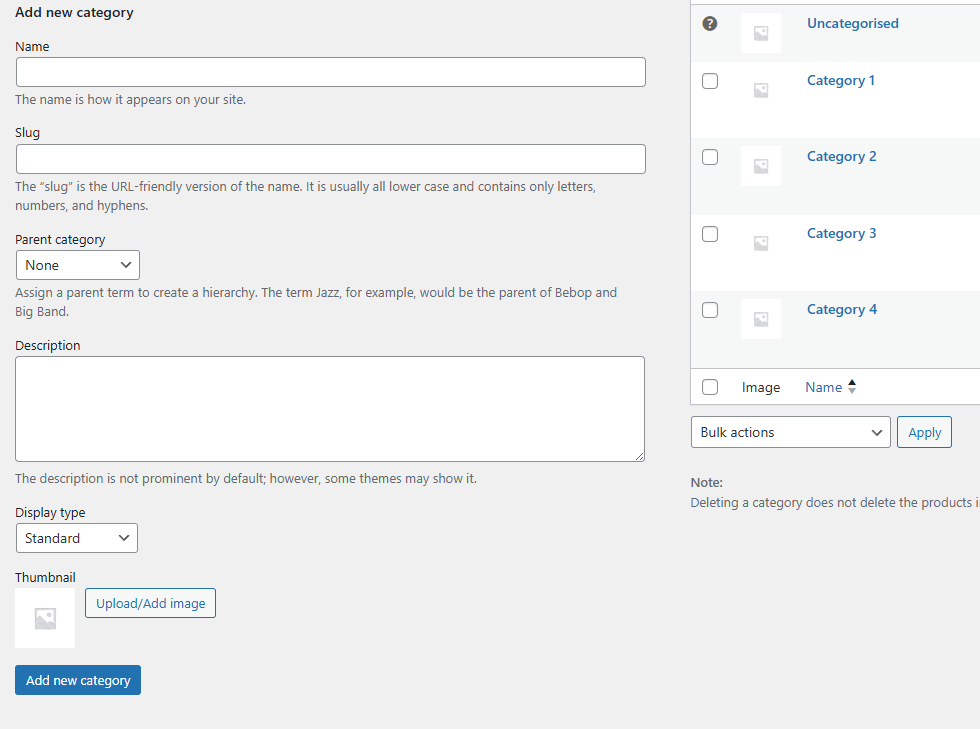
On the Product Categories page, you will see a form on the left-hand side to add a new category.
Fill in the following fields:
-
Name → Enter the category name (e.g., “Shoes” or “Accessories”).
-
Slug → (Optional) This is the URL-friendly version of the name. If left blank, WordPress will generate it automatically. Example:
shoes. -
Parent Category → Choose this if your new category should be a subcategory.
-
Example: A “Sneakers” category could be under the parent category “Shoes.”
-
-
Description → Add details about the category. This can help SEO and may appear on the category page depending on your theme.
-
Display Type → Choose how products are shown on the category page (default, products, subcategories, or both).
Once complete, click Add New Category.